
Volt 2
Listen. Visualize. Align. - Audio volume management tool -
In game and video production, managing the volume of large numbers of audio files is essential.
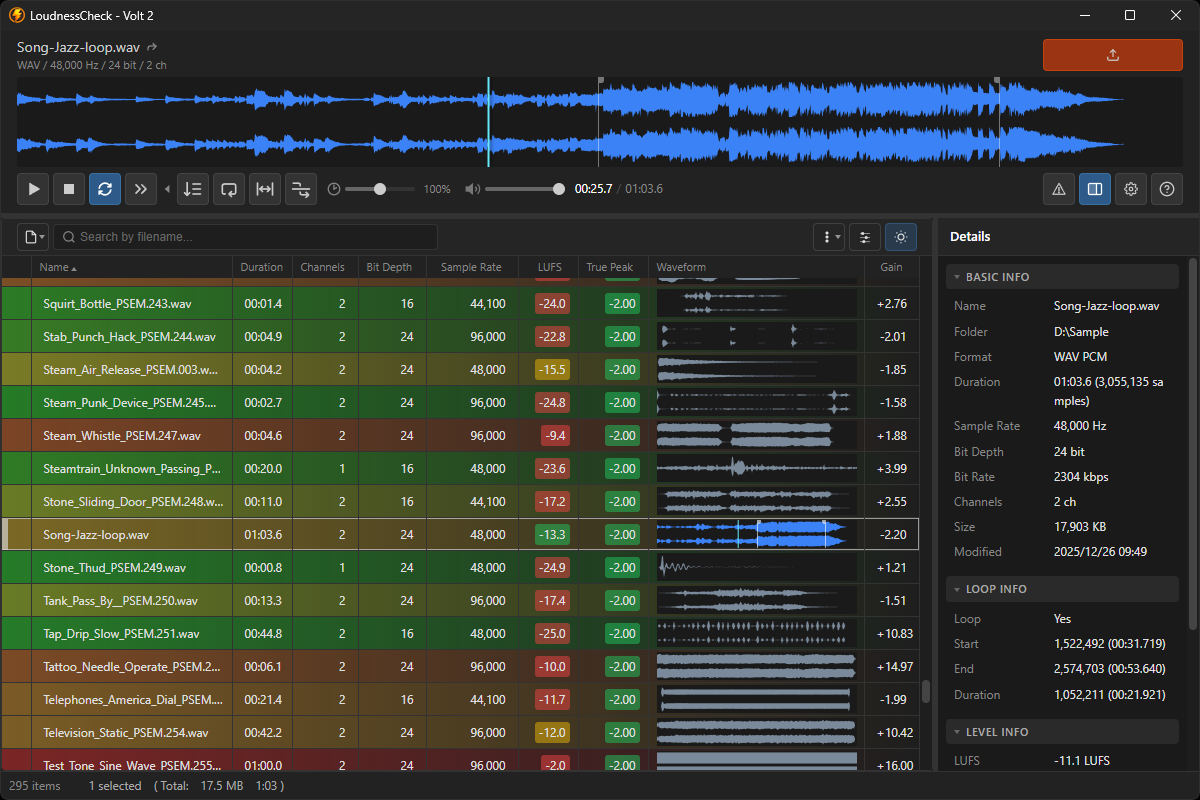
Volt 2 is a desktop application that allows you to measure LUFS and peak levels, review and adjust the volume of multiple files, and export them directly.
You can work efficiently while verifying results with both your eyes and ears.
Features
All-in-one measurement and adjustmentView LUFS, True Peak, and Sample Peak measurements in a single list, adjust gain, and export files directly. No need to switch between measurement tools and editors.
Automatic anomaly detection
Automatically detects issues that are easy to overlook, such as clipping, distortion, and unintended silence, helping ensure reliable pre-delivery checks.
Wide format support
Supports import and export of major audio formats including WAV, AIFF, FLAC, OGG, MP3, AAC and M4A.
Cross-platform support
Available on both Windows 11 and macOS (Intel / Apple Silicon).
Key Functions
- Loudness Measurement: Measure LUFS, True Peak, and Sample Peak for each file
- Gain Adjustment & Export: Set gain based on measurement results and export directly (format conversion supported)
- Anomaly Detection: Automatically detect clipping, distortion, silence, and files that are effectively mono
- Multichannel Support: Supports formats from mono to 8 channels
- View Styles: Organize large numbers of files with conditional highlighting and filtering
- Customization: Theme (light/dark), text size, display language, and keyboard shortcuts
- Supported Formats: WAV / AIFF / FLAC / OGG / MP3 / AAC / M4A
Recommended For
- Those who need to level-match large numbers of audio files
- Those who want to check file status in bulk before delivery
- Those who want to adjust gain while reviewing loudness measurements
- Those handling various types of assets such as sound effects, voice, and music
Download
Volt 2 is available free of charge for both commercial and non-commercial use.Supported OS: Windows 11 and macOS Ventura or later (Intel / Apple Silicon)
This application does not transmit any user data or usage information externally.
Important Notes
This application is currently released as a beta version. Some issues may still remain.
Specifications are subject to change in future updates.
On Windows, a security warning may be displayed during installation.
If this occurs, click "More info" and then "Run anyway" to proceed.
INSPION shall not be liable for any damages arising from the use of this application.
If you encounter any issues while using the application, please feel free to contact us.
This application is currently released as a beta version. Some issues may still remain.
Specifications are subject to change in future updates.
On Windows, a security warning may be displayed during installation.
If this occurs, click "More info" and then "Run anyway" to proceed.
INSPION shall not be liable for any damages arising from the use of this application.
If you encounter any issues while using the application, please feel free to contact us.